Pricing

Professional tooling. Clear plans.

Try the full studio free in your browser. Subscribe to download the desktop app, lock it to your machine, and export at full resolution. Cancel anytime.

MonthlyAnnual2 months free
Trial
Free
Full studio in your browser — no download, no card.
  • ✓ Full studio, online
  • ✓ Up to 300 DPI · 20×20 cm
  • ✓ 3 sample exports — no watermark
  • ✓ No install, no risk
  • ✓ Sign up with your company e-mail address
Start free
Most popular
Pro
€199/mo€1,990/yr
For a single operator or one machine.
  • ✓ Desktop studio · up to 1200 DPI
  • ✓ All effects · AI object masking
  • ✓ ICC colour management · live 3D preview
  • ✓ Unlimited size & regions
  • ✓ 1 user · 1 printer profile · 2 computers per user
  • ✓ Email support
  • — Not included: multi-pass production, machine calibration, cost report — see Pro Multi-Pass
Get Pro
Multi-pass
Pro Multi-Pass
€399/mo€3,990/yr
Everything in Pro, plus relief beyond your machine's single-pass ceiling.
  • ✓ Everything in Pro
  • ✓ Multi-pass production — up to 2 cm
  • ✓ Machine calibration
  • ✓ Ink use and cost before you print
  • ✓ Cost report written next to the print data
  • ✓ 1 user · 1 printer profile · 2 computers per user
Get Pro Multi-Pass
Studio
€399/mo€3,990/yr
For studios and small teams.
  • ✓ Everything in Pro
  • ✓ 3 users · 3 printer profiles · 2 computers per user
  • ✓ Split-channel & advanced export
  • ✓ Priority support
  • ✓ Onboarding call
  • — Not included: multi-pass production, machine calibration, cost report — see Studio Multi-Pass
Get Studio
Multi-pass
Studio Multi-Pass
€699/mo€6,990/yr
Everything in Studio, plus multi-pass on every machine.
  • ✓ Everything in Studio
  • ✓ Multi-pass production on all 3 printer profiles — up to 2 cm
  • ✓ Separate calibration per printer
  • ✓ Ink use and cost report before you print
  • ✓ 3 users · 3 printer profiles · 2 computers per user
Get Studio Multi-Pass
Enterprise
Custom
For high-volume, multi-site operations.
  • ✓ 10 users · 10 printer profiles — more on request
  • ✓ Multi-pass, calibration & cost report included
  • ✓ Dedicated support & SLA
  • ✓ Custom terms & invoicing
Contact sales

Prices exclude VAT. Customers in Türkiye pay 20% VAT, added at checkout; sales outside Türkiye are export sales at 0% VAT. Billed via secure checkout (3-D Secure). Each user can install the app on 2 computers (e.g. work + home) with 1 active session at a time — manage devices anytime from your dashboard. Printer profiles are counted separately: 1, 3 or 10 depending on the plan.

What's in each plan

CapabilityTrialProPro Multi-PassStudioStudio Multi-PassEnterprise
Where it runsBrowserDesktopDesktopDesktopDesktopDesktop
Max resolution300 DPI1200 DPI1200 DPI1200 DPI1200 DPI1200 DPI
Print size & regionsLimitedUnlimitedUnlimitedUnlimitedUnlimitedUnlimited
Watermark-free export✓✓✓✓✓✓
All effects & AI masking✓✓✓✓✓✓
Users (licences)—113310 · more on request
Printer profiles—113310 · more on request
Computers per user (1 active session)—22222
Multi-pass production——✓—✓✓
Machine calibration——✓—✓✓
Ink use & cost report——✓—✓✓
Split-channel export—✓✓✓✓✓
Support (support@futuristink.com)EmailEmailEmailPriorityPriorityDedicated + SLA
System requirements

Will it run on your machine?

Minimum

  • ✓ Windows 10 (21H2 or later) or Windows 11, 64-bit · WebView2 runtime
  • ✓ 6-core x64 CPU · 16 GB RAM
  • ✓ NVIDIA GPU with 8 GB VRAM (RTX 3060 / 4060 class) and a current NVIDIA driver
  • ✓ ~15 GB free SSD space
  • ✓ Internet for activation & updates

NVIDIA only

  • ✓ AI object masking and text-based selection run on the NVIDIA GPU — 8 GB VRAM minimum
  • ✓ Text-based selection has no CPU fallback: without an NVIDIA GPU that tool is not available

Recommended

  • ✓ NVIDIA GPU with 12 GB+ VRAM (RTX 4070 class or newer) for large AI masks at full resolution
  • ✓ 8-core CPU · 32 GB RAM · NVMe SSD for large multi-pass jobs

Not sure? Try the free browser trial first — it runs in the cloud. Then check your computer against the specs above before you buy.

Multi-pass production

Do what your machine can't

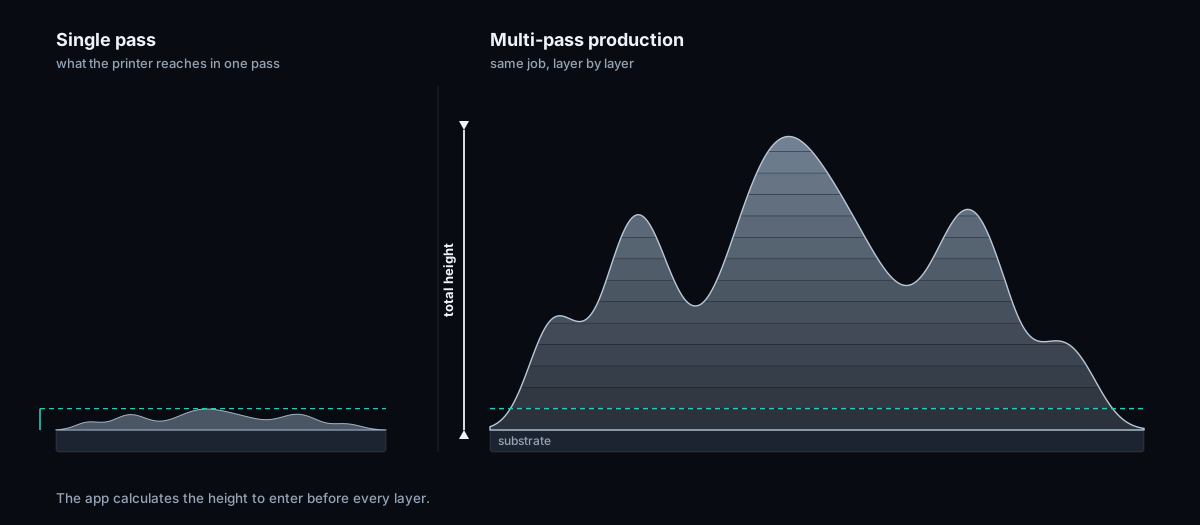
Every UV printer reaches its own ceiling in a single pass.

Without buying a new machine — with the one you already have.

  • ✓Measured millimetres
  • ✓Layer-by-layer operator sheet
  • ✓Estimated ink use and cost
  • ✓Layer count from your machine
Add multi-pass

Same file, same machine.

See the difference

Same design, same machine

Height is the only variable.

Single passyour machine's own ceiling
Multi-pass — 20 mmsame machine, same file
A second job

Same behaviour, a different design

All from a single height map.

How it works

The job is split into layers

Each slice is a separate print.
Cost

Quote before you start

Estimated before printing.

What it needs: a short calibration first.
How to get it

From payment to printing in four steps

1 · Choose your plan

Pick monthly or yearly.

2 · Pay securely

Card payment via our provider.

3 · Activate your computer

Paste the code the app shows you.

4 · Calibrate, then print

A short calibration per printer — on the Multi-Pass plans.

FAQ

Questions, answered.

How does licensing work?

After checkout you get an account. In your dashboard you paste the code the desktop app shows you and instantly receive a signed licence for that computer. Every user can install on 2 computers, with 1 active session at a time. Printer profiles are counted separately: 1 on Pro and Pro Multi-Pass, 3 on Studio and Studio Multi-Pass, 10 on Enterprise.

Can I move my licence to another computer?

Yes. Remove the old computer from your dashboard and activate the new one — no support ticket needed, within the 2 computers per user. Printer profiles are separate from computers and stay within your plan's count (1, 3 or 10).

What happens if I cancel?

You keep full access until the end of the paid period; nothing further is charged and there is no pro-rata refund for the remaining days. After the period ends, plus a 7-day grace window, the desktop app locks — there is no trial mode. Renew and it unlocks again. Your projects and files are always yours.

Do you offer annual billing?

Yes — switch the toggle above. Annual plans are billed once a year and include two months free.

Which printers are supported?

Durst P5 is verified end-to-end; other layered-printing UV flatbeds are supported via configurable profiles. See Machines.

Does the subscription renew automatically?

Yes. Your plan renews automatically with the card stored at checkout — monthly or yearly, whichever you chose. We e-mail you before each renewal: 3 days ahead on monthly plans, 14 days ahead on yearly plans. If a payment fails we retry up to 3 times over a 7-day grace period, during which the app keeps working; after that the subscription is marked past due. You can cancel anytime from your dashboard — access continues until the end of the paid period and nothing further is charged.

Do the prices include VAT?

No — all prices are shown excluding VAT. Customers in Türkiye pay 20% VAT, which is added at checkout. Sales to customers outside Türkiye are export sales at 0% VAT; your invoice states this.